Cleaning Business Scheduling Software: What Actually Matters
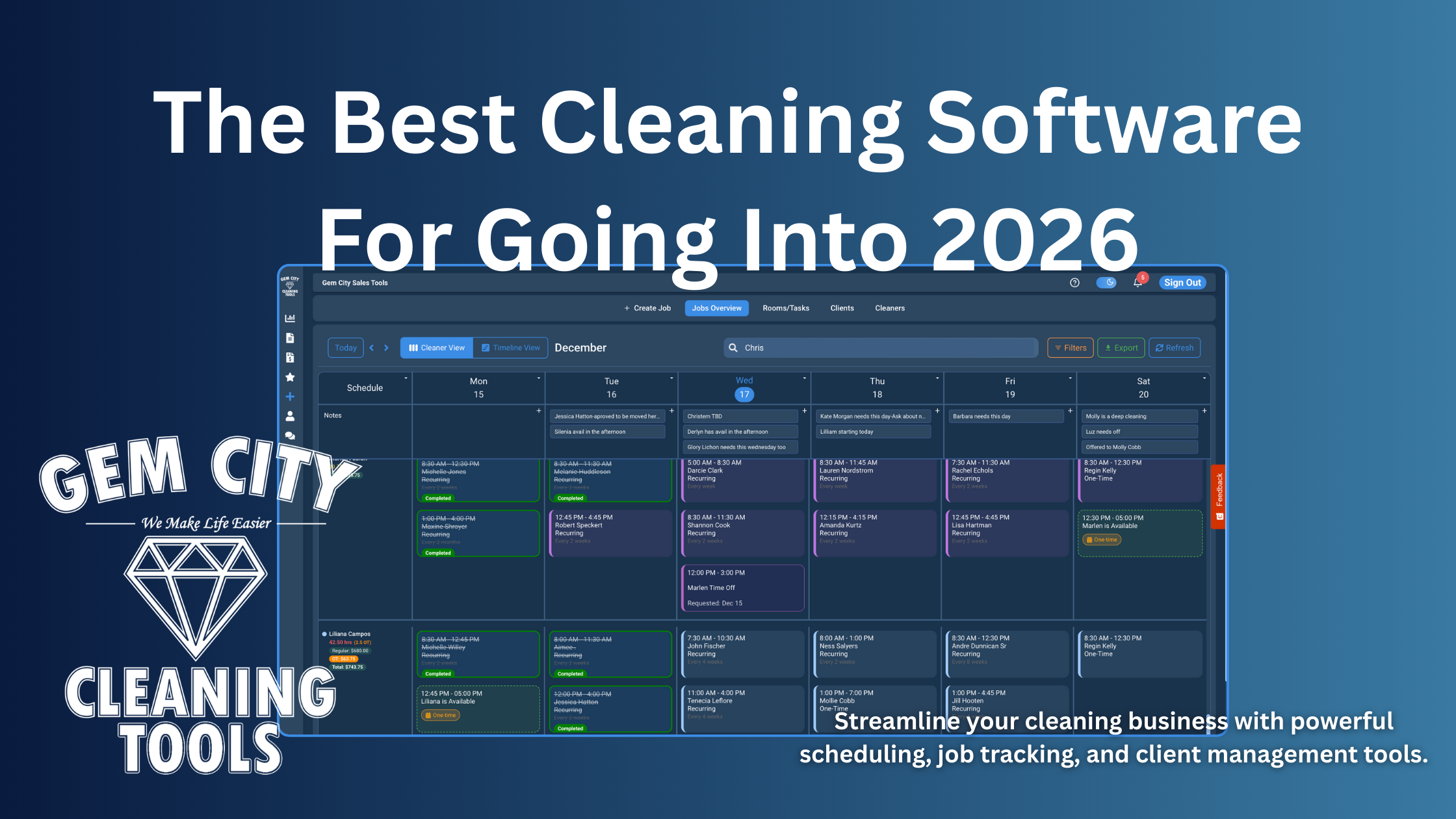
After 8 years testing every major cleaning business scheduling software — ZenMaid, Jobber, Housecall Pro — here's what saves time, not marketing fluff.
Chris Wilson
Last Updated: December 20, 2025 - All pricing and features verified with live testing across the major platforms cleaning businesses actually consider
In this guide:
- Quick Software Comparison Table
- When ZenMaid Makes Sense
- When You Need Jobber Instead
- Housecall Pro vs The Rest
- What Features Actually Matter
- ROI Calculator & Time Savings
- My Testing Results
- Free Trials to Start
Looking for the full software picture, not just scheduling? This post is a deep-dive on scheduling software specifically. For a broader buyer's guide covering scheduling, CRM, invoicing, and team management together, see Best Cleaning Business Software in 2026: The Complete Buyer's Guide.
I'm Chris Wilson, founder of Gem City Cleaning Tools in Dayton, OH. I've been running cleaning operations for 8 years and have scheduled over 10,000 cleaning jobs across residential and commercial properties.
After wasting 2+ hours every Sunday on manual scheduling, losing clients to double-bookings, and watching profit disappear into "gap time" between jobs, I tested the major scheduling software options most cleaning businesses evaluate—Jobber, Housecall Pro, ZenMaid, ServiceM8, and half a dozen others.
Most promise to "streamline your cleaning business." Almost all just digitize the same broken manual process.
This guide shows what actually matters based on 8 years of real operational experience scheduling 5-15 cleaners daily—not marketing materials written by people who've never run a route.
Quick Answer: What's the Best Cleaning Business Scheduling Software?
For solo operators with just one or two people, Google Calendar and a spreadsheet still work fine. Don't pay for software until you hit 30+ jobs per week. The investment isn't worth it yet, and you'll spend more time learning the software than you save.
Quick Recommendation by Team Size:
- 1-2 people: Gem City Tools (Free forever) or Google Calendar until you hit 30+ jobs/week
- 3-8 cleaners: Gem City Tools (Free or Pro $88/mo), ZenMaid ($19-49/mo), or ServiceM8 ($29-79/mo)
- 8-15 cleaners: Gem City Tools (Pro $88/mo), Jobber ($29-599/mo), or Housecall Pro ($59-329/mo)
- 15+ cleaners: Enterprise solutions or custom-built platforms
For small teams running 3-5 cleaners and handling 30-100 jobs weekly, you need conflict detection and recurring job automation. ZenMaid (starting at $19/month) or similar cleaning-focused tools handle the basics well without overwhelming you with features you won't use.
For growing operations with 5-10 cleaners managing 100-200 jobs per week, time tracking and automated scheduling become critical. Jobber (starting at $29/month) or Housecall Pro (starting at $59/month) have these features, but you're paying for invoicing, quotes, and parts inventory built for plumbers and contractors—not recurring cleaning routes.
For established businesses running 10+ cleaners and 200+ jobs weekly, you need everything working together: AI job parsing, GPS time clock, real-time profit tracking, and client self-service portals. Most "maid software" lacks these advanced features. Field service software has them but charges premium prices for tools you'll never touch.
The number one feature that matters most is conflict detection. It prevents disasters before they happen. The biggest time-saver is recurring job automation, which saves 1-2 hours every single week. The hidden profit protector nobody talks about is real-time efficiency tracking, which catches margin leaks immediately instead of three weeks later when you finally look at QuickBooks.
FAQ: Cleaning Business Scheduling Software
What features do I actually need in cleaning scheduling software?
The essential features you can't operate without include conflict detection to prevent double-booking, mobile access so cleaners can see schedules from their phones, recurring job automation for your weekly clients, and a customer database to track everything in one place.
High-value features that save significant time include a time clock with GPS verification, availability gap visibility so you can see wasted time between jobs, automated conflict detection that prevents double-bookings, and automated notifications that reduce the constant "where am I tomorrow" texts.
Nice-to-have luxury features include a client portal for self-service, AI job parsing to extract details from emails, QuickBooks integration for accounting, and advanced analytics dashboards. These are great when you can afford them, but they're not make-or-break for operations.
How much should I pay for scheduling software?
At the $0-50 per month tier, you're getting basic scheduling with no automation. This only makes sense for solo operators who are just getting started.
The $50-150 monthly range is the sweet spot for businesses with 3-10 employees. You should get conflict detection, time tracking, and recurring jobs at this price point. Anything less means you're overpaying for what you're getting.
Premium options running $150-300+ per month are designed for teams of 10 or more employees. At this tier, you should absolutely have advanced analytics, integrations, and automation included. The ROI calculation is simple: if software saves you 3+ hours weekly, it pays for itself at any admin rate over $15 per hour.
Can I use free scheduling software for my cleaning business?
Yes, if you're solo or have 1-2 employees handling under 30 jobs weekly, Google Calendar works fine. But you'll hit a wall somewhere between 30-50 jobs per week. That's when double-bookings start costing you clients, scheduling takes 2+ hours weekly, you lose track of who's available when, and cleaners constantly text asking about tomorrow's schedule.
At that point, free software costs more in lost time than paid software costs in subscription fees. The math stops working in your favor.
What's the difference between cleaning-specific software vs general field service software?
Cleaning-specific tools like ZenMaid are built for recurring weekly clients. They have simpler interfaces and lower costs, typically $50-100 monthly. But they often have limited analytics and automation capabilities.
Field service software like Jobber and Housecall Pro offers robust feature sets and better mobile apps. The problem is they're built for one-time jobs—think plumbers and contractors who quote each job fresh. They cost more ($130-250/month) and include overkill features like parts inventory and complex quoting you'll never use.
The bottom line: cleaning-specific software works great until you hit 10+ employees. Then you need the advanced features that only field service software or custom solutions can provide.
Do I need GPS time clock for my cleaners?
You need it if cleaners work solo without supervision, if you've had issues with time accuracy, if clients ask when cleaning started and ended, or if payroll discrepancies are eating into your margins.
Here's how it works: cleaners can only clock in when physically at the job site using geofencing technology. You see exact arrival and departure times, which solves the "I worked 8 hours" when they actually worked 6.5 problem.
The value adds up fast. Catching just 5-15 minutes per cleaner per day of time discrepancies equals 2-7 hours weekly across 5 cleaners. That's $40-140 per week saved, which pays for most software subscriptions entirely.
How long does it take to set up cleaning business software?
Week one takes 2-4 hours to import your customer list, add cleaner profiles, and set up recurring job schedules. Week two requires 1-2 hours to test scheduling features, train cleaners on the mobile app (15 minutes each), and do a parallel run with your old system. Week three needs about an hour to go live, monitor for issues, and adjust settings.
Total setup time runs 4-7 hours spread over three weeks. Time saved ongoing is 2-5 hours per week minimum. The payback period is typically 1-3 weeks.
Can customers book directly through the software?
Some software offers online booking widgets, but for cleaning businesses, direct booking often backfires. It seems good because of 24/7 availability, no missed calls, and professional appearance.
But it creates problems: customers book inefficiently creating gaps in your schedule, they choose times that don't fit your cleaners' availability, you lose control over efficient scheduling, and it works poorly for recurring clients who need custom scheduling based on your existing workflows.
The better approach is using inquiry forms that capture details so you can schedule strategically. Or use a client portal for existing customers to reschedule within your rules, not wide-open booking for everyone.
Software Comparison: What You Actually Get
Before diving into features, here's what the major options actually deliver for cleaning businesses. Most cleaning-specific software like ZenMaid works great until you hit 8-10 employees, then you need advanced features they don't have. Field service software like Jobber and Housecall Pro has those features but wasn't built for cleaning operations—you're paying for invoicing, quotes, and parts inventory you'll never use.
| Software | Best For | Price/Month | Key Strengths | Missing |
|---|---|---|---|---|
| ZenMaid | 3-8 cleaners | $19-49 | Simple, cleaning-focused, recurring jobs | Advanced analytics, limited automation |
| Jobber | 5-15 employees | $29-599 | Full mobile app, QuickBooks integration | Built for one-time jobs, not recurring routes |
| Housecall Pro | 10+ employees | $59-329 | Full field service suite, good mobile app | Expensive, features you don't need |
| ServiceM8 | 5-10 employees | $29-349 | Good value, decent mobile app | Learning curve, Australian-focused |
| Gem City Tools | Any size (3+ cleaners) | Free, Pro $88 | AI job parser, real-time profit tracking, gap visibility, free-forever tier | Newer platform (built 2025) |
Note: Price ranges reflect publicly advertised tiers as of December 20, 2025. Features, integrations, and support levels vary significantly by plan—always verify which tier includes the specific features you need before committing.
Cleaning-Specific Features Comparison
Not all scheduling software handles cleaning operations the same way. Here's how the major options stack up on the features that actually matter for recurring cleaning routes and multi-cleaner teams.
| Feature | ZenMaid | Jobber | Housecall Pro | ServiceM8 | Gem City Tools |
|---|---|---|---|---|---|
| Recurring Jobs Automation | ✅ Excellent | ✅ Excellent | ✅ Excellent | ✅ Good | ✅ Excellent |
| Multi-Cleaner Assignment | ✅ Excellent | ✅ Excellent | ✅ Excellent | ✅ Excellent | ✅ Excellent |
| Gap Visibility Between Jobs | ❌ No | ❌ No | ❌ No | ❌ No | ✅ Yes |
| Time-Off Auto-Blocking | ✅ Yes | ✅ Yes | ✅ Yes | ✅ Yes | ✅ Yes |
| GPS Time Clock | ❌ No | ✅ Yes | ✅ Yes | ✅ Yes | ✅ Yes |
| Real-Time Profit Tracking | ❌ No | ✅ Yes | ✅ Yes | ❌ No | ✅ Yes |
| Client Self-Service Portal | ⚠️ Limited | ✅ Yes | ✅ Yes | ⚠️ Limited | ✅ Yes |
| Mobile App Quality | ✅ Good | ✅ Excellent | ✅ Excellent | ✅ Good | ✅ Good |
| Conflict Detection | ⚠️ Basic | ✅ Good | ✅ Good | ✅ Good | ✅ Excellent |
What Makes Scheduling Software Actually Useful? (Real Operational Experience)
Most comparison articles list the same generic features: "scheduling," "time tracking," "mobile app." But after scheduling thousands of cleaning jobs, here's what actually matters when you're in the trenches every day.
1. Conflict Detection (The #1 Feature)
Manual scheduling fails in predictable ways. You double-book a cleaner because you forgot they were already scheduled. You schedule someone on their day off because you didn't check the master list. You assign a job when someone's at another location 15 miles away, and they can't possibly make it on time.
Good software automatically flags conflicts before you publish the schedule. Real example: you're creating a 2pm job and the software shows "Sarah is scheduled 1-3pm at another location 15 miles away." You catch it before the client calls complaining, before Sarah shows up at the wrong house, before your reputation takes a hit. I've written separately about why so much cleaning software still lets double-bookings slip through despite advertising "conflict detection" on the pricing page — the difference between checking and actually preventing matters a lot here.
The Real Cost of Double-Bookings: Lost clients who won't give you a second chance, rushed jobs where quality suffers, cleaner frustration that leads to turnover, and reputation damage that spreads through word of mouth faster than positive reviews ever will.
2. Availability Gap Visibility
This is the hidden scheduling killer nobody warns you about. You schedule a job at 2pm, but your cleaner is booked 9am-12pm and 4pm-6pm. They have a 2-hour gap sitting at home doing nothing. You don't realize it until they complain about wasted time, their paycheck is smaller than expected, or they quit because they found a job with consistent hours.
Good software shows availability gaps visually so you can fill them efficiently. Real example: cleaner has jobs from 10am-12pm and 3pm-5pm with a 2-hour gap. The software highlights it. You move the 3pm job to start at 12pm. Now they work 5 hours straight instead of wasting 2 hours sitting at home, they make more money, you maximize labor efficiency, and everyone's happier.
Why Gap Visibility Matters for Retention: This single feature impacts cleaner retention more than almost anything else. People quit over unpredictable schedules and wasted time, not over the actual cleaning work.

3. Time-Off Request Management
Cleaners request time off via text, email, and voicemail. You mentally note it but forget to write it down. Three weeks later you schedule them anyway because you're staring at the calendar not your old text messages. They don't show up. The client is furious. You scramble to find coverage.
Good software handles this systematically. Cleaners submit time-off requests in-app through a simple form. You approve or deny with one click. The calendar automatically blocks those dates. The system makes it impossible to schedule them during blocked time—their name is grayed out and won't let you drag jobs to them.
Real example: Maria requests December 24-26 off for family. You approve in the app. When creating the Christmas week schedule, Maria's name appears grayed out for those dates. Even if you forget she requested it off, the system won't let you schedule her. The conflict is prevented automatically.
4. Recurring Job Automation
Weekly recurring clients are your revenue foundation, but manually copying them each week is tedious and error-prone. You copy Mrs. Henderson's Tuesday 10am slot. You copy Mr. Chen's Friday 2pm slot. You do this for 50+ clients every single week. It takes 1-2 hours and you occasionally miss one, leading to an angry client who expected you.
Good software creates recurring jobs automatically based on the schedule you set once. Weekly, bi-weekly, monthly, or custom patterns—set it and forget it. Real example: client wants cleaning every other Tuesday at 10am. You set the recurrence rule once. Software creates jobs automatically for the next 52 weeks. If you need to skip one week because they're traveling, delete that single instance. The rest remain untouched.
This feature alone saves 1-2 hours per week, every week, forever. That's 52-104 hours annually you get back. I used to be that owner losing an entire Sunday afternoon to this exact problem — why I spent 2 hours every Sunday scheduling cleaners walks through what that looked like before automation fixed it.
5. Mobile Access for Cleaners
Your cleaners need to see their schedules from their phones, not call you asking "Where am I tomorrow?" This seems obvious but many businesses still text schedules or expect cleaners to remember what you told them three days ago.
Good software provides a mobile app or mobile-responsive web interface. Cleaners get push notifications for schedule changes. Job details are right there: address, customer notes, special requests like "use side door" or "dog barks but is friendly." One-tap navigation opens their maps app with the address already entered.
Real example: you update tomorrow's schedule at 8pm because a client rescheduled. Cleaners get a push notification on their phone. They check the app, see the updated schedule, and set their alarm for the right time. No "I didn't know about that job" excuses the next morning. No phone tag trying to reach everyone before they leave.
The time this saves isn't measured in hours. It's measured in eliminated frustration and communication overhead that used to consume your entire evening.

Mobile dashboard gives cleaners instant visibility into their performance, upcoming schedule, and weekly hours
Advanced Features: What Separates Good from Great
Once you have the basics working smoothly, these advanced features separate software that saves time from software that fundamentally transforms how your business operates.
AI Job Parser
The problem is straightforward but time-consuming. Customer emails or texts a job request with the address, date, rooms to clean, and special notes scattered throughout their message. You manually copy each piece of information into separate fields in your system. This takes 10+ minutes per job when you factor in switching between screens, copying text, and making sure you didn't miss anything.
The AI solution extracts structured data from unstructured text automatically. Customer texts: "Hi! Need cleaning this Saturday 12/20 at 3pm. Address: 123 Main St, Dayton OH 45402. 3 bed 2 bath, deep clean kitchen and bathrooms. 2 cats so please be careful when opening doors. Budget around $200."
The AI job parser extracts: Date as Saturday, December 20, 2025 at 3:00pm. Address as 123 Main St, Dayton, OH 45402. Rooms as kitchen, 3 bedrooms, and 2 bathrooms. Service type as deep clean. Special notes captured as "2 cats - be careful with doors." Budget noted as $200.
Job creation drops from 10 minutes to 2 minutes. Over 20 jobs weekly, that's 2.5 hours saved every single week. It adds up to 130 hours annually—more than three full work weeks. For a closer look at how this actually works, see the AI job parser guide.
Client Self-Service Portal
The problem grows with success. Customers text and call to reschedule, add services, or ask questions. You handle 20+ requests per week, which consumes roughly 10 hours of pure administrative time. Each request follows the same pattern: client reaches out, you check the calendar, you confirm availability, you manually move things around, you confirm back with the client.
The portal solution lets clients manage their own accounts. They can view upcoming appointments with all details visible, reschedule within rules you define, cancel with proper notice, add service add-ons for their next cleaning, update payment information, and request quotes for one-time additional services.
Real example shows the time difference clearly. Before: Client texts "Can we move Tuesday to Thursday?" You check the calendar, reply "Thursday at 10am work?" They confirm "Yes." You manually move the appointment and update everyone. This takes 5-10 minutes of back-and-forth spread across an hour.
After: Client logs into the portal, drags their appointment from Tuesday to Thursday. The system checks availability in real-time, confirms the move is possible, notifies the cleaner automatically, and updates everything. Done in 30 seconds with zero admin time from you.
The impact is substantial: 8-12 hours saved per week handling customer requests, which equals $160-240 weekly at $20/hour admin cost. That's up to $12,480 annually in time savings alone.

Real-Time Dashboard Analytics
The problem is timing. You don't know if you're profitable until the end of the month when you finally sit down with QuickBooks. By then, you've been bleeding money for 4 weeks and can't fix what already happened.
The solution shows key metrics updated continuously throughout the day. Revenue versus estimated revenue reveals when jobs take longer than quoted, showing profitability issues immediately not weeks later. Gap time costs highlight wasted time between jobs and inefficient scheduling. Cleaner efficiency shows jobs completed versus hours paid, identifying slow cleaners or unrealistic time estimates. Overtime hours track who's hitting 40+ hours before they hit it, preventing surprise labor costs.
Real example from mid-week: Wednesday morning dashboard shows this week's revenue at $8,200, estimated revenue at $9,100, and gap time at 15 hours costing $20/hour which equals $300 wasted. You spot the issue Wednesday and optimize Thursday and Friday schedules to close the gap before the week ends.
The impact changes how you run the business: catch profit leaks in real-time instead of discovering them 3 weeks later when you can't do anything about it. Fix scheduling problems immediately instead of repeating them all month. Make informed decisions based on current data instead of gut feelings or outdated information from last month. If you want the full breakdown of which numbers actually matter beyond a single daily snapshot, I covered all 7 in the KPI reports every cleaning business should track.

Time Clock with GPS
The problem is verification. Cleaners clock in from home instead of the job site. You pay for 8 hours but they worked 6.5 hours. Or they arrive late and leave early with no way for you to prove it when they claim they were there the full time.
The GPS solution only allows clocking in when physically on-site. The software creates a geofence around each job address. Cleaners can only clock in when their phone's GPS shows they're inside that geofence. You see actual arrival and departure times automatically. The system compares actual times to scheduled times and flags discrepancies.
Real example breaks down the difference clearly. Job scheduled for 9:00am-12:00pm totaling 3 hours. GPS time clock shows they arrived at 9:12am (12 minutes late), departed at 11:40am (20 minutes early), with actual time of 2 hours 28 minutes. Without GPS you'd pay 3 hours. With GPS you pay actual time and see arrival patterns that reveal problems.
The benefits compound: accurate payroll that matches reality, identify late arrival patterns before they become habits, prove to clients when cleaning started and ended if there's ever a dispute, and collect data for performance reviews based on facts not feelings.

The payback period is usually 2-4 weeks because it catches enough time discrepancies to pay for the feature entirely.

Pricing: What's Actually Worth Paying For
Free and low-cost options in the $0-50 monthly range give you basic scheduling, a customer database, and mobile access. What you don't get is conflict detection, time tracking, analytics, or automation. This tier is for businesses with 1-3 employees handling under 30 jobs monthly who have lots of manual time available. The real cost isn't the subscription—it's your time. You'll spend 5-10 hours weekly on admin work that paid software does in 1 hour.
Mid-tier options running $50-150 monthly provide automated conflict detection, time clock functionality, recurring jobs, basic reporting, and mobile apps for your team. What you don't get is AI features, custom reports, or priority support. This tier fits businesses with 3-10 employees managing 50-200 jobs monthly who want to reduce admin time significantly. The ROI usually breaks even if it saves 3-5 hours weekly of admin time.
Premium options at $150-300+ monthly include everything from mid-tier plus AI job parsing, advanced analytics, client portals, integrations with QuickBooks and other tools, and priority support when you need help. This tier serves businesses with 10+ employees handling 200+ jobs monthly who want to scale efficiently. It should save 10-15 hours weekly minimum, which at $25/hour admin cost equals $250-375 weekly saved.
Real-World Use Case: Weekly Scheduling Workflow
The manual method using Google Calendar looks like this for most cleaning business owners: Sunday 2pm to 4:30pm creating next week's schedule. First 30 minutes opening a spreadsheet with recurring clients, copying each recurring job to the calendar, checking if any requested changes via text or email. Next 15 minutes adding new one-time jobs by checking email and texts for new requests, manually typing each into the calendar. Then 45 minutes assigning cleaners by texting 5 people to check availability, checking time-off requests stored in 3 different places, trying to group jobs by location using Google Maps for each one, and praying you didn't double-book anyone. Finally 30 minutes handling Monday morning conflicts when someone says "I told you I had that day off," discovering two cleaners scheduled for the same time, and redoing everything Tuesday when a client reschedules.
Time saved with manual method: 2.5 hours plus Monday morning fires that blow up your whole day.
The Sunday Scheduling Transformation:
Manual: 2.5 hours of stress + Monday morning conflicts
With Software: 30 minutes + zero conflicts + zero Monday panic
Result: 2 hours saved weekly = 104 hours yearly = $2,600 at $25/hour
With good scheduling software the process transforms completely: Sunday 3pm to 3:30pm reviewing and finalizing the schedule. Recurring jobs are already created automatically taking 0 minutes because software did this while you slept. Adding new jobs takes 5 minutes because AI parsed 5 customer emails and texts, you just review the extracted data and click save. Assigning cleaners takes 5 minutes by dragging unassigned jobs to cleaners while software shows availability and flags conflicts in real-time. Publishing takes 2 minutes to click "publish schedule" sending push notifications to cleaners with no Monday morning fires because conflicts were caught before you published.
Total time with good software: 30 minutes with zero conflicts and zero Monday morning panic.
Time saved: 2 hours per week equals 104 hours per year, which equals $2,600 at $25/hour. That's before counting the value of preventing client-losing mistakes and eliminating Monday morning stress.
Features That Sound Good But Don't Matter
Marketing teams love adding features that sound impressive in sales presentations but don't actually help scheduling in real operations.
Team chat sounds good because it promises to "reduce text messages" and "keep everything in one place." The reality is your cleaners already text each other and you. They're not switching apps just to chat about job details because that's one more app to check. When it actually helps is if you have 20+ employees and need to broadcast announcements to everyone simultaneously. For 2-10 employees, regular texts work fine and everyone already knows how to use them.
Built-in invoicing sounds good because you can "manage everything in one place" without switching between systems. The reality is QuickBooks exists and your accountant needs exports from a real accounting system anyway. Built-in invoicing in scheduling software is usually clunky because it's not the core focus of development. When it actually helps is if you have very simple invoicing like flat-rate services with no deposits or refunds and you desperately want one less login to remember.
Social media integration sounds good for "posting to Facebook and Instagram about jobs." The reality is no one cares about your schedule on social media. Your customers don't want to see "just completed a job at 123 Main St" clogging their feed. It's a waste of development time that could have been spent on features that actually matter. When it actually helps is probably never for scheduling software.
Custom branding sounds good to "match your business colors" and look professional. The reality is your cleaners don't care what color the buttons are. They care if they can see their schedule fast without squinting at tiny text or clicking through 5 screens. When it actually helps is for client-facing features like portals and booking forms where customers see your brand. Internal scheduling doesn't need your logo on every screen.
How to Choose: Decision Framework
The decision comes down to four key questions that determine which software makes sense for your specific situation.
First, how many employees do you have? If you have 1-3 employees, start with free or low-cost options because Google Calendar might still work fine at that scale. With 4-10 employees, you need real scheduling software with conflict detection to prevent the disasters that come from managing multiple people across multiple jobs. At 10+ employees, you need advanced features like optimization, analytics, and automation because manual processes break completely at this scale.
Second, how many jobs per week are you handling? Under 30 jobs weekly means basic software works because manual scheduling is still manageable even if tedious. Between 30-100 jobs weekly, you need automation for recurring jobs and conflict detection because manual tracking fails consistently. Over 100 jobs weekly, advanced features pay for themselves immediately through AI parsing, optimization, and analytics that prevent expensive mistakes.
Third, what's your biggest pain point right now? If scheduling takes too long, focus on automation including recurring jobs, templates, and AI parsing. If you're always double-booking, focus on conflict detection and availability tracking. If cleaners constantly ask about their schedule, focus on mobile apps and notifications. If you don't know if you're profitable, focus on time tracking and analytics. If customers always call to reschedule, focus on client self-service portals.
Fourth, what's your admin time worth? Calculate your actual hourly rate for admin work. If you're the owner doing admin, your time could be spent on sales, quality control, or growth activities—value that at $50-100/hour. If you're hiring someone for admin, an office manager costs $20-25/hour while a virtual assistant runs $15-20/hour. When software saves 5 hours weekly at $25/hour, that's $125 weekly or $6,500 annually. Any software under $200 monthly pays for itself immediately with that math.
Red Flags: Software to Avoid
Some warning signs indicate software that will waste your time and money regardless of how good the sales presentation sounds.
Business Model Red Flags
Run away immediately if you see:
-
"Custom development required" for basic scheduling features. You'll be locked into one vendor paying thousands in setup fees for features that should work out of the box. Good software works without custom development.
-
Long-term contracts. Good software offers month-to-month pricing because they know you'll stay once you see the value. If they require 1-year+ contracts upfront, they know people would cancel after trying it because it doesn't deliver.
-
No free trial. If they won't let you try it free for 7-14 days, they know it's not intuitive enough to sell itself. Good software is obvious within 2 days of actually using it. The companies confident in their product let you test-drive it with no credit card required.
Technical Red Flags
Warning signs the software is outdated or poorly built:
-
No mobile app in 2025 means the software is outdated and the company isn't keeping up with basic technology trends. Your cleaners work from phones not desktops. If there's no mobile app or the mobile site is barely functional, you'll fight constant battles getting your team to use it.
-
"All-in-one" software that does scheduling, invoicing, CRM, marketing, websites, and more usually means each feature is half-baked. They spread development resources too thin trying to do everything instead of doing core scheduling excellently. Better choice is best-in-class scheduling that integrates with your existing specialized tools.
Cleaning-Specific Red Flags
These indicate the software wasn't built for cleaning operations:
- Can't prevent double-booking or only warns you after you've already created the conflict
- Recurring jobs are painful requiring manual copying each week instead of true automation
- Time-off requests don't block scheduling automatically—you can still assign jobs during blocked dates
- Mobile app is clunky or requires 5+ taps to see tomorrow's schedule
- No gap visibility between jobs—can't see when cleaners have wasted downtime
- No audit trail of who changed the schedule when, making it impossible to track down errors
- Can't handle multi-cleaner assignments cleanly—built for solo technicians not cleaning teams
The Honest Truth About ROI
Let's do real math on whether scheduling software is actually worth the money you'll spend. These numbers are based on our operation at the 8-12 employee scale, but the methodology works at any size—just plug in your own hourly rates and time measurements.
The costs are straightforward: mid-tier software at $100 monthly equals $1,200 annually in subscription fees.
Time savings add up quickly in our experience: manual scheduling was taking 2.5 hours weekly, with software it dropped to 0.5 hours weekly, for a savings of 2 hours per week or 104 hours per year. At $25/hour admin cost, that's 104 hours × $25 = $2,600 annually in time alone.
Error prevention saves money you'd otherwise lose: conservative estimate from our operation shows roughly 1 double-booking per month that would lose a client, average client lifetime value in cleaning is around $2,000, and good software prevents most double-bookings. That's $2,000 yearly minimum in retained revenue. Your mileage will vary based on how tight your manual scheduling is today.
Efficiency gains compound the savings: In our operation, gap visibility and better scheduling saved roughly 3 hours weekly in wasted time across our team (reduced gaps between jobs, better availability management), at $20/hour labor cost that's 156 hours × $20 = $3,120 per year in improved productivity.
Total ROI based on our numbers: $7,720 per year in benefits minus $1,200 per year in costs equals $6,520 net annual benefit. The payback period is 1.8 months.
Real ROI Breakdown (Based on Our 8-12 Employee Operation):
- Time Savings: $2,600/year (2 hours weekly at $25/hour)
- Error Prevention: $2,000/year (1 lost client prevented monthly)
- Efficiency Gains: $3,120/year (better scheduling, gap reduction)
- Total Value: $7,720/year for $1,200 investment
- Payback: 1.8 months
Your numbers will vary—track your actual manual scheduling time, admin hourly rate, and client LTV to calculate your specific ROI.
Most businesses see even bigger gains once they fully utilize all features and optimize their processes around the software capabilities.
My Testing Results: What Worked (And What Didn't)
After 8 years of running cleaning operations and testing every option on the market, here's what I actually learned from hands-on use, not from reading marketing materials or watching demos.
When ZenMaid Actually Works
ZenMaid is great if you have 3-8 cleaners, mostly recurring weekly clients, and want a simple cleaning-focused interface that your team can learn in 15 minutes. We used it for 2.5-3 years starting around our second year in business. It worked perfectly at that scale—cleaners had their schedules on their phones, clients got automatic reminders, and we could move appointments easily when needed.
The real-world experience: When we had about 5 cleaners and 120-130 clients, ZenMaid handled everything smoothly. The interface made sense for cleaning businesses specifically. Setting up recurring jobs was intuitive. The mobile app worked well for our cleaners who just needed to see where they were going each day.
Where it started breaking down: Around year 4 when we hit 8-10 employees and 18 appointments daily, the calendar became overwhelming. I'd literally stare at the screen for 2 hours looking at the same week trying to find where new customers could fit. The biggest issue was accidentally double-booking people without realizing it. Sometimes two people would be on one job and you'd see one color on the calendar, but there was a duplicate booking for an employee you didn't catch. Cleaners would occasionally show up to the wrong house because the schedule wasn't clear.
When You'll Outgrow ZenMaid: We hit the wall at 8-10 employees with 18 daily appointments. Signs you need more: spending 2+ hours staring at the calendar, accidentally double-booking despite careful checking, struggling to see where new clients fit, calendar becoming visually overwhelming.
The limitation isn't the software's fault—it's built for businesses at a certain scale. If you're in the 3-8 employee range with straightforward recurring routes, ZenMaid does exactly what it should at a fair price starting at $19/month. But if you're growing beyond that, you'll hit the same wall we did where you need more sophisticated scheduling intelligence.
When You Need Jobber Instead
Jobber is great if QuickBooks integration is critical for your accounting workflow, you handle a mix of one-time and recurring jobs, and mobile app quality matters more than cleaning-specific features.
I tested it extensively for 3 months in 2021 after we outgrew ZenMaid. The mobile app was more polished than cleaning-specific alternatives. QuickBooks sync worked smoothly for businesses that need tight accounting integration.
The real issue: paying $249+ monthly for features we'd never use felt wasteful. Jobber includes robust invoicing, quote management, and parts inventory tracking because it's built for trades like plumbers and electricians who quote every job fresh. For cleaning businesses with mostly recurring clients at set rates, you're paying for capabilities that sit unused. The software works well, but the pricing doesn't match cleaning business workflows.
When Housecall Pro Makes Sense
Housecall Pro is great if you have 15+ employees, need enterprise-level features across the platform, can afford premium pricing of $300+ monthly, and want priority support for when issues arise.
I demoed it extensively but never went live because the cost didn't justify the value for our operation. The feature set is comprehensive and the platform is polished. If you're running a large operation where the additional capabilities make a material difference, the investment makes sense. For most cleaning businesses under 15 employees, you're paying for scale you haven't reached yet.
When ServiceM8 Works
ServiceM8 is great if you want good value at $29-349 monthly, can handle a moderate learning curve, and don't mind that the software is Australian-focused with some features that don't apply to US operations. Several cleaning business owners I know use it successfully at the 3-5 employee range and appreciate the unlimited users at each tier.
What I Ended Up Building (And Why)
Full disclosure: after testing everything available, I built Gem City Cleaning Tools for our own operations because I couldn't find software that combined what we actually needed.
The gap I couldn't find anywhere: software that combined cleaning-specific workflow (recurring routes, gap visibility, double-booking prevention) with advanced features (AI parsing, real-time profit tracking) without paying for field service features we'd never touch—and at a price that made sense for small to mid-size operations.
What made the difference in actual daily use: the AI job parser turns customer texts and emails into structured jobs in 30 seconds instead of 10 minutes of manual data entry. Gap visibility cards showed wasted time between jobs immediately, not after cleaners complained about sitting at home unpaid. Real-time profit tracking revealed efficiency issues on Wednesday, not 3 weeks later when QuickBooks reports finally got reviewed. Client portal let customers reschedule themselves, saving 8-10 hours weekly of administrative back-and-forth.
Time saved in practice: Sunday scheduling dropped from 2.5 hours to 25 minutes. Efficiency improved as cleaners had fewer gaps and better-filled schedules. Admin load decreased as customer requests handling went from 10 hours weekly to 2 hours weekly.
Where competitors win: ZenMaid beats us on simplicity for small teams—their interface is cleaner for the 3-5 employee range. Jobber and Housecall Pro have more mature third-party integrations and better field service polish if you need quote management or parts inventory. ServiceM8 offers better value if you don't need AI parsing or real-time profit tracking.
Is it right for you? Probably not if you have under 5 employees or under 50 jobs weekly. ZenMaid or similar cleaning-focused tools will serve you better at that scale without the complexity.
But if you're at 8-15 employees scheduling 100-300 jobs weekly and feeling the pain of manual scheduling, missing real-time visibility into profitability, or spending hours handling customer reschedule requests, the ROI is immediate and measurable.
The Real Decision Framework
Don't choose based on what I use. Choose based on your actual situation right now.
Software Selection by Business Stage:
Solo to 3 cleaners (30-50 jobs/week):
Gem City Tools (Free forever for up to 2 people), Google Calendar (free), or ZenMaid ($19/mo). Keep it simple while building.
3-8 cleaners (50-150 jobs/week):
Gem City Tools (Free or Pro $88/mo), ZenMaid ($19-49/mo), or ServiceM8 ($29-79/mo). Essentials without overwhelming features.
8-15 cleaners (150-300 jobs/week):
Gem City Tools (Pro $88/mo), Jobber ($29-599/mo), or Housecall Pro ($59-329/mo).
Decision factors at this stage:
- Real-time profitability critical? (tight margins = yes)
- Customers reschedule often? (15+ requests/week = client portal)
- Manual data entry from emails? (20+ jobs/week = AI job parser)
- Want to start free and scale up? (Gem City Tools' free-forever tier means no trial clock at all until you outgrow it)
15+ cleaners (300+ jobs/week):
Custom-built solution or enterprise software. Off-the-shelf breaks at this scale.
Next Steps: Start With a Free Trial
Most cleaning software offers 14-day free trials with no credit card required. Here's how to test efficiently and make a decision fast.
Week 1 tests core scheduling: Import 10-20 customers (don't do everyone yet), create this week's schedule in the new software, time yourself to see how long it actually takes versus your current method, and test conflict detection by trying to double-book someone to see if it catches the problem.
Week 2 tests the mobile app: Give access to 2 cleaners (your most tech-savvy ones first), have them clock in and out for real jobs using GPS, ask for honest feedback about whether it's easier than your current text-based system, and check accuracy to ensure times match reality.
Week 3 calculates ROI: Document how many hours the software saved you over two weeks, count how many errors were prevented that would have cost you client relationships, measure whether scheduling efficiency improved, calculate monthly subscription cost × 12 months, and make your decision based on whether time and error savings exceed the annual cost.
Free Trial Testing Checklist:
- Days 1-4: Import 10-20 customers, create this week's schedule, time yourself vs current method, test conflict detection
- Days 5-9: Give 2 cleaners access, have them clock in/out on real jobs, gather feedback, verify accuracy
- Days 10-14: Calculate hours saved, errors prevented, measure admin time reduction, make decision
With Gem City Tools' free-forever tier, you're not racing a trial clock at all for teams of 1-2—you can run it for real, at no cost, for as long as it takes to decide.
Free trials to start:
Most competitors, including Gem City Tools, offer 14-day trials:
- ZenMaid - 14-day trial, $19-49/month
- Jobber - 14-day trial, $29-599/month
- Housecall Pro - 14-day trial, $59-329/month
- ServiceM8 - 14-day trial, $29-349/month
Gem City Cleaning Tools - 14-day trial, no credit card required
Free forever plan available for 1-2 users, Professional features at $88/month
Why the Free-Forever Tier Matters More Than Trial Length: A 14-day trial is enough to test core scheduling if you follow the checklist above. But if you're solo or running 2 people, you don't need to rush a trial decision at all—Gem City Tools' free tier lets you run the software for real, indefinitely, until you actually outgrow it and need Pro features.
Pro tip: Test 2-3 options simultaneously during week 1-2. Create the same week's schedule in each system. You'll immediately see which workflow fits your brain better and which one your team adopts naturally.
Pro Tip for Testing: Test 2-3 options simultaneously. Create the same week's schedule in each system. You'll immediately see which workflow fits your brain, which interface makes sense, and which one your team will actually use instead of fighting against.
Questions? Real Advice From Someone Who's Tested Everything
I've spent 8 years in the operational trenches dealing with scheduling nightmares, software limitations, and the reality of running routes daily. If you're stuck choosing between options or want real-world advice on what makes sense at your scale based on your specific situation, reach out.
No sales pitch. Just honest feedback from someone who's tested everything and knows what actually works versus what sounds good in marketing materials but falls apart in daily use. I remember spending 2 hours every Sunday staring at a calendar trying to fit everything together. I remember the panic of Monday morning double-booking discoveries. I remember losing clients because we couldn't handle scheduling at scale. The right software prevents all of that, but only if it matches where your business actually is right now.