5 Scheduling Red Flags Every Cleaning Business Owner Misses
Scheduling mistakes cost cleaning businesses $10-21k/year. Learn the 5 red flags to spot (and fix) before losing clients. Includes free tools comparison.
Chris Wilson
I lost a $6,000/year client because of a scheduling mistake I didn't catch until it was too late.
The worst part? The warning signs were there for weeks. I just couldn't see them in my calendar.
After talking to dozens of cleaning business owners, I've realized we all miss the same red flags. Here are the 5 most dangerous ones—and how to spot them before they cost you.
Red Flag #1: Double-Bookings You Don't Catch Until Day-Of
The scenario: You schedule David for a 10am job on Tuesday. Three days later, a client calls with an urgent request, and you schedule David for 10am Tuesday... again.
Why it happens: You're scheduling at different times, looking at different views, distracted by other tasks. Your calendar doesn't scream "WARNING: CONFLICT!"
The real cost:
- Frantic morning phone calls trying to find coverage
- One client gets rescheduled (and annoyed)
- Lost time: 1-2 hours of scrambling
- Reputation damage: "They're disorganized"
How often this happens: More than you think. I had 1-2 double-bookings per month before I fixed this.
The Breaking Point: I lost Mrs. Henderson—a $200/month client—because this was the second time in a month I'd messed up her schedule. She fired us on the spot.
What you need: A system that flags conflicts automatically. Not after you click "save." Not when you review later. Immediately, as you're scheduling.
How to Fix Red Flag #1: Double-Bookings
Step 1: Choose scheduling software with real-time conflict detection (not just calendar sync) — here's how the calendar view surfaces conflicts as you schedule
Step 2: Test it: Try to create a double-booking intentionally - the software should block you immediately
Step 3: Set up alerts for near-conflicts (jobs scheduled back-to-back with no travel time)
Step 4: Review your last 3 months of bookings to identify any missed conflicts
Step 5: Train anyone who schedules to always check the conflict warnings before overriding
Tools that prevent this: Gem City Cleaning Tools (free for 2 people), ZenMaid, Jobber, Housecall Pro all have automatic conflict detection.
Not every tool that claims "conflict detection" actually blocks the double-booking in real time — some just flag it after the fact, which doesn't help you on the morning it matters. I broke down which cleaning software actually prevents double-bookings vs. just displaying a warning →
Red Flag #2: Time-Off Requests Buried in Texts
The scenario: Maria texts you on Tuesday: "Hey, can I have next Thursday off?" You reply "sure!" and forget to actually block her calendar. Thursday morning arrives and Maria isn't showing up to her jobs.
Why it happens:
- Time-off requests come via text, call, in-person
- You're juggling 10 things at once
- There's no system to track "approved but not yet blocked"
- You rely on your memory (which is terrible under stress)
The real cost:
- Last-minute scrambling to find coverage
- Angry clients who took time off work to be home
- Frustrated employees: "I told you I needed off!"
- Lost productivity: 2-4 hours fixing the mess
The pattern I noticed: This happened most often with recurring time-off. "I need every other Tuesday off for class" turns into a nightmare of "wait, is this week the off week or the on week?"
Employee Turnover Risk: When cleaners feel like their requests get ignored (even when you just forgot), they start job hunting. Replacing an employee costs $1,500-3,000.
What you need: A system where time-off requests are captured in one place, flagged on the schedule, and tracked for patterns (one-time vs. recurring).
How to Fix Red Flag #2: Time-Off Tracking
Step 1: Choose a centralized system (app, scheduling software, or shared calendar)
Step 2: Announce the new policy: "All time-off requests must be submitted in [system], not via text"
Step 3: Set approval workflow: Review requests within 48 hours, check for conflicts
Step 4: Auto-block approved dates so they can't be accidentally scheduled
Step 5: Review monthly for patterns (recurring time-off that needs permanent blocking)
Quick Comparison: Time-Off Management Tools
| Tool | Cost | Best For | Key Features |
|---|---|---|---|
| Gem City Cleaning Tools | Free (up to 2 people) | Cleaning businesses | Integrated scheduling, auto-blocking, mobile requests, conflict detection |
| Homebase | Free | Very small teams (1-3) | Basic PTO requests, approval workflow |
| When I Work | $2.50/user/month | Budget-conscious | PTO tracking, shift swapping, mobile app |
| ZenMaid | $19/month | Cleaning-specific | Availability management, recurring time-off |
What scheduling software do cleaning businesses use? Most successful cleaning businesses use integrated scheduling tools like Gem City Cleaning Tools, ZenMaid, or Jobber that combine scheduling with time-off management. The key is choosing software that prevents conflicts automatically rather than just displaying a calendar. See the comparison above to find which tool matches your team size and budget.
Red Flag #3: No Visibility Into Actual vs. Estimated Job Times
The scenario: You estimate the Johnson residence takes 2 hours. You schedule the next job 2.5 hours later (with 30 min buffer). But your cleaner consistently takes 3.5 hours at the Johnsons. Now they're rushing to the next job or showing up late.
Why it happens: You estimate based on square footage or gut feel, but you never track actual time spent. Your calendar shows "2 hours" forever, even though reality is different.
The real cost:
- Chronically late arrivals to subsequent jobs
- Rushed cleaning quality (trying to make up time)
- Cleaners feeling stressed and overworked
- Clients complaining about late arrivals
What I discovered: When I finally tracked actual times, I found:
- 30% of my jobs were underestimated by 30+ minutes
- 15% were overestimated (I was leaving money on the table)
- Some cleaners were consistently faster than my estimates
The fix that shocked me: I had been underpricing one property by 40%. Once I saw the real time data, I adjusted pricing and made an extra $2,400/year from that ONE client.
Efficiency Insight: Track the gap between estimated time and actual time (clock-in to clock-out). This reveals which jobs are underpriced and which cleaners are more efficient.
What you need: Automatic time tracking (GPS clock-in/out) that compares estimated vs. actual time, showing you where your estimates are off.
How to Fix Red Flag #3: Time Estimation Gaps
Step 1: Implement GPS clock-in/clock-out for all jobs (most cleaning software includes this)
Step 2: Weekly, run a report comparing estimated time vs. actual time for all jobs
Step 3: Flag any job where actual time exceeds estimated by 30+ minutes
Step 4: For flagged jobs: Either adjust pricing up or optimize the cleaning process
Step 5: Update your standard estimates based on 3 months of actual data
ROI tip: Finding just 2-3 underpriced jobs can add $2,000-5,000 in annual revenue.
Red Flag #4: Cleaners Traveling Inefficiently (Burning Gas & Time)
The scenario: Maria finishes a job on the north side at 11am, then drives across town to the south side for 1pm, then back to the north side for 3pm. She spends 90 minutes driving that day—time you're paying for but not billing.
Why it happens: You schedule based on when clients want service, not based on optimizing cleaner routes. You don't have a visual map of where jobs are located.
The real cost:
- Wasted drive time: 30-60 minutes/day per cleaner
- Gas costs: $10-20/day in unnecessary mileage
- Cleaner fatigue: more driving = more exhaustion = lower quality
- Fewer jobs per day: inefficient routing limits capacity
The math: If 3 cleaners each waste 45 minutes driving inefficiently, that's 2.25 hours/day = 11.25 hours/week = 585 hours/year. At $20/hour labor cost, that's $11,700 wasted annually.
Plus gas: Unnecessary driving adds 100+ miles per week per cleaner. At $0.50/mile (gas + wear), that's another $7,800/year.
Total waste from poor routing: $19,500/year.
Quick Win: Even without route optimization software, you can manually group jobs by zip code/area and save 20-30% of drive time. But automated route optimization can save 40-50%.
What you need: Visual map view of scheduled jobs + route optimization that suggests efficient job sequencing based on location and time windows.
How to Fix Red Flag #4: Inefficient Routes
Step 1: Plot your current weekly schedule on Google Maps (or use scheduling software with map view)
Step 2: Identify patterns: Is the same cleaner criss-crossing town unnecessarily?
Step 3: Group jobs by zip code/area - aim to keep cleaners within 2-3 zip codes per day
Step 4: When scheduling new jobs, check the map first - place new clients near existing routes
Step 5: Consider route optimization software for automatic sequencing (saves 40-50% of drive time)
Manual quick win: Even without software, grouping jobs geographically can save 20-30% of drive time immediately.
Red Flag #5: Client Reschedule Patterns (The Repeat Offenders)
The scenario: Mrs. Thompson reschedules "just this once" every single month. You don't notice the pattern until you're frustrated and can't figure out why.
Why it happens: Each reschedule seems like a one-off. You don't track frequency because it's scattered across weeks/months. You rely on memory to notice patterns (which doesn't work).
The real cost:
- Schedule strain: constant last-minute changes
- Lost productivity: time spent rescheduling
- Cleaner frustration: "Why do I keep getting yanked around?"
- Opportunity cost: That time slot could go to a reliable client
The hidden truth: Some clients are profitable on paper but unprofitable in reality when you factor in the admin time their constant changes require.
My "aha moment": When I finally tracked reschedule frequency, I found:
- 10% of clients caused 60% of schedule changes
- One client rescheduled 11 times in 6 months
- The admin time for high-maintenance clients erased their profitability
What I did: I had honest conversations with repeat reschedulers. Some became more reliable. Others I referred to competitors (politely). My schedule got 50% more stable.
That conversation got a lot easier once I backed it with an actual cancellation policy instead of just asking nicely — here's the full policy and fee structure that changed those conversations for good →
Profitability Killer: A $150/month client who reschedules 8 times per year is costing you $80-120 in admin time (at $10-15/hour). That's a 53-80% reduction in profit margin.
What you need: Automatic tracking of client reschedule frequency. See at a glance which clients are high-maintenance before they become a profitability problem.
How to Fix Red Flag #5: Repeat Reschedulers
Step 1: Start tracking reschedule frequency manually (spreadsheet) or use software that tracks automatically
Step 2: Set a threshold: 4+ reschedules in 3 months = high-maintenance client
Step 3: When threshold is hit, review: Is this client still profitable after admin time?
Step 4: Have an honest conversation: "I've noticed frequent reschedules. Can we find a more stable schedule?"
Step 5: Consider referring chronic reschedulers to competitors - your schedule stability matters
The math: A $150/month client who reschedules 8 times/year costs $80-120 in admin time. That's 53-80% margin erosion.
Why You're Missing These Red Flags
It's not your fault. Normal calendar software doesn't show you patterns. It shows you individual appointments. I've written before about the hidden cost of "just using a calendar" for a cleaning business → — this is the same blind spot.
You can stare at your calendar all day and never notice:
- The double-booking hidden on page 2
- The time-off request you approved but didn't block
- The job that takes 3.5 hours but you estimated 2
- The inefficient route that wastes 45 minutes
- The client who reschedules constantly
These patterns are invisible until software makes them visible.
What Changed for Me
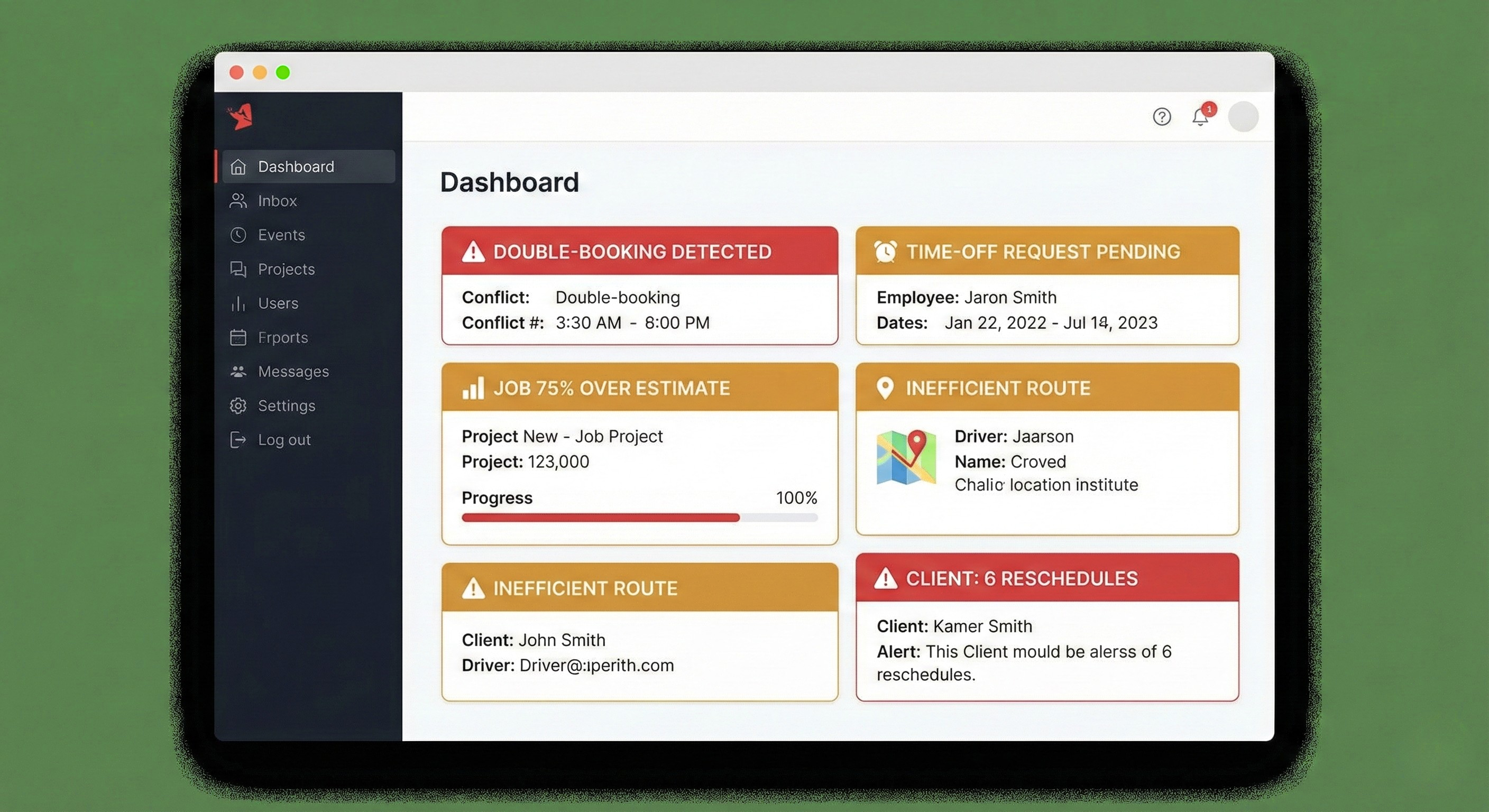
I used to spend 2 hours every Sunday night manually scheduling cleaners →, squinting at a calendar trying to catch exactly these problems by eye. When I built Gem City Cleaning Tools, I designed it specifically to flag these red flags automatically:
🚨 Double-Booking Alert: "Warning: David has 2 jobs at 10am Tuesday"
⏰ Time-Off Flag: "Maria has Thursday blocked (recurring every other week)"
📊 Efficiency Gap: "Johnson job: Estimated 2hr, Actual 3.5hr (75% over)"
📍 Route Inefficiency: "Maria driving 45 min between jobs—optimize route?"
⚠️ Reschedule Pattern: "Mrs. Thompson: 6 reschedules in 3 months"
Instead of hunting for problems, the problems are flagged for me.
Scheduling went from 2 hours of detective work to 15 minutes of decision-making.
The Questions to Ask Yourself
-
How many double-bookings have you had in the last 3 months? (If more than zero, you need automatic conflict detection)
-
Have you ever forgotten a time-off request? (If yes, you need a time-off tracking system)
-
Do you know which jobs consistently take longer than estimated? (If no, you're probably underpricing some clients)
-
How much time do your cleaners spend driving per day? (If you don't know, you're probably wasting 20-40% of drive time)
-
Which clients reschedule most often? (If you can't name them instantly, you don't have visibility into the pattern)
If you answered "I don't know" to any of these, you're flying blind.
Stop Missing Red Flags
Want to see how to catch these problems before they cost you clients and money?
I'll show you:
- How automatic conflict detection prevents double-bookings
- How time-off request cards keep you organized
- How efficiency tracking reveals underpriced jobs
- How route optimization saves drive time and gas
- How reschedule pattern tracking identifies problem clients
Because the red flags are there. You just need software that shows them to you.
Frequently Asked Questions
How long should scheduling take for a cleaning business?
With manual methods, most owners spend 1-3 hours per week. With intelligent scheduling software, it should take 10-20 minutes.
What causes double-bookings in cleaning schedules?
Double-bookings happen when you schedule at different times without real-time conflict detection. Manual calendars don't flag conflicts automatically.
How much money do scheduling mistakes cost?
The average cleaning business loses $10,000-21,000 per year from scheduling inefficiencies, lost clients, and missed opportunities.
What's the ROI of cleaning business software?
Most businesses see ROI within the first month through time savings alone. Factor in prevented mistakes and increased capacity, and the ROI is 5-10x.
How do I know if I'm missing scheduling red flags?
If you've had any double-bookings, forgotten time-off requests, or can't instantly name which clients reschedule most often, you're missing red flags that software would catch automatically.
About the Author: Chris Wilson runs Gem City Cleaning Crew and built Gem City Cleaning Tools after losing too many clients to scheduling mistakes he should have caught. Now the software catches them for him—and for other cleaning business owners who are tired of flying blind.